
Steps
Step 1
Step 1 – 7/10 (went through all the CSS Fundamentals Course and attached notes here. Also demonstrated use of margins, color, backgrounds, and common units of measurement in the new website I started making from scratch for BYU Broadcasting which I attached the file for here as well). I liked the course, but didn’t get to play around as much as I would have liked because this one didn’t have good demo stuff, it was more just an overview, so my hands on was lacking.
Notes
Deliverables website
BYU Broadcasting Training Page
Step 2
Step 2 – 10/10 (I went through all the HTML Essential Training 1-4, took notes, and demonstrated basic page structure, formatting page content, and structuring the content on the start of my 2 BYU Broadcasting pages.) I learned a bunch; HTML is making more sense now.
Deliverables HTML Pages (I am having some issues saving things I will have to talk with you about on Tuesday, but I think this works).
Step 3
Step 3 – 10/10 (I went through all the HTML Essential Training 4-8, took notes, and demonstrated creating links and lists. I also expanded my project to include a little more stuff. I want to have a base BYU Broadcasting Training page that will have the training links needed for the three different types of employees at BYU Broadcasting. So, I have started that page and also the other inside sales training page that I was originally going to do. I set up both pages with an external styling CSS page and started messing around with that a little. I will make things look good as I learn more about CSS in my next two steps. I also set up the external page to put in my Javascript, but I have not decided what scripting interactions I want to put in there yet. I will add those in as I do steps 7&8).
I tried zipping all this stuff in one folder so you could see what I am up to in the BYUBroadcastingTrainingWebsite. Let me know if that works for you to see everything.
BYUBroadcastingTrainingWebsite
Design Blueprints
- Purpose: The Goal of my product is to create a base station for all the training for the BYU Broadcasting Membership Department. This includes the students in Member Services, Member Accounts, and Telefunding. I will also create one online training for InsideSales as a separate page. This will train the Telefunding students all they need to know to do their job of calling Donors using Inside Sales.
- Approach: The Technologies that I will use for the training will be the 2 website pages I will develope. The one page will be the base station to house and link to all the necessary training. The other page will actually do the training for Inside Sales. This will consist of some text for the main points and then video tutorials.
- Flow: The flow for both pages is simple and depicted below in the attachments. The BYU Broadcasting Training Page has links to go to all the training needed by the students in the training department. The Inside Sales training consists of a tabular page covering all the necessary topics of Inside Sales. Each tab will have a brief description with key points and a training video.
- Function: The function is also very simple and described below through the diagrams. The diagrams explain what each link will do when clicked.
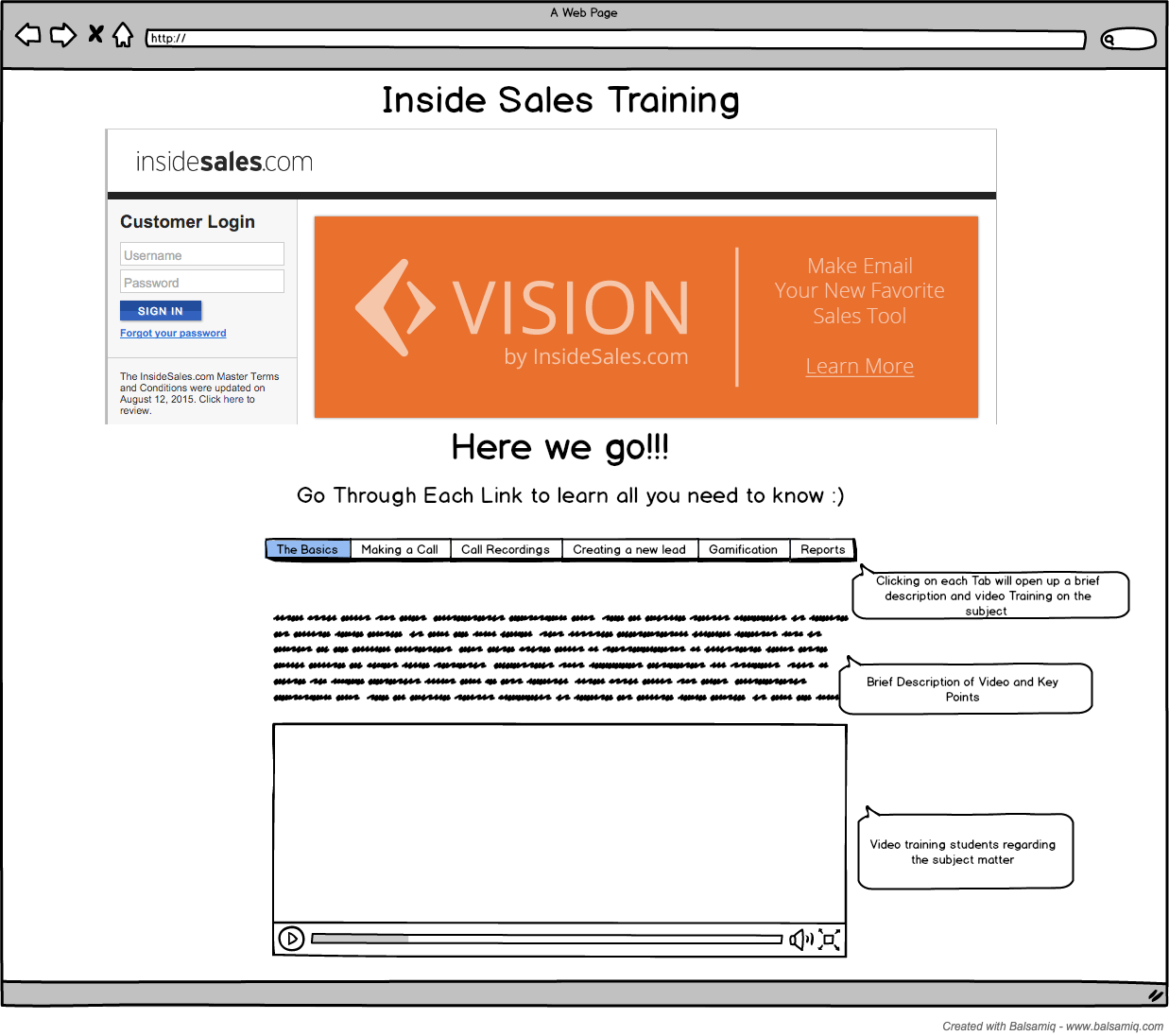
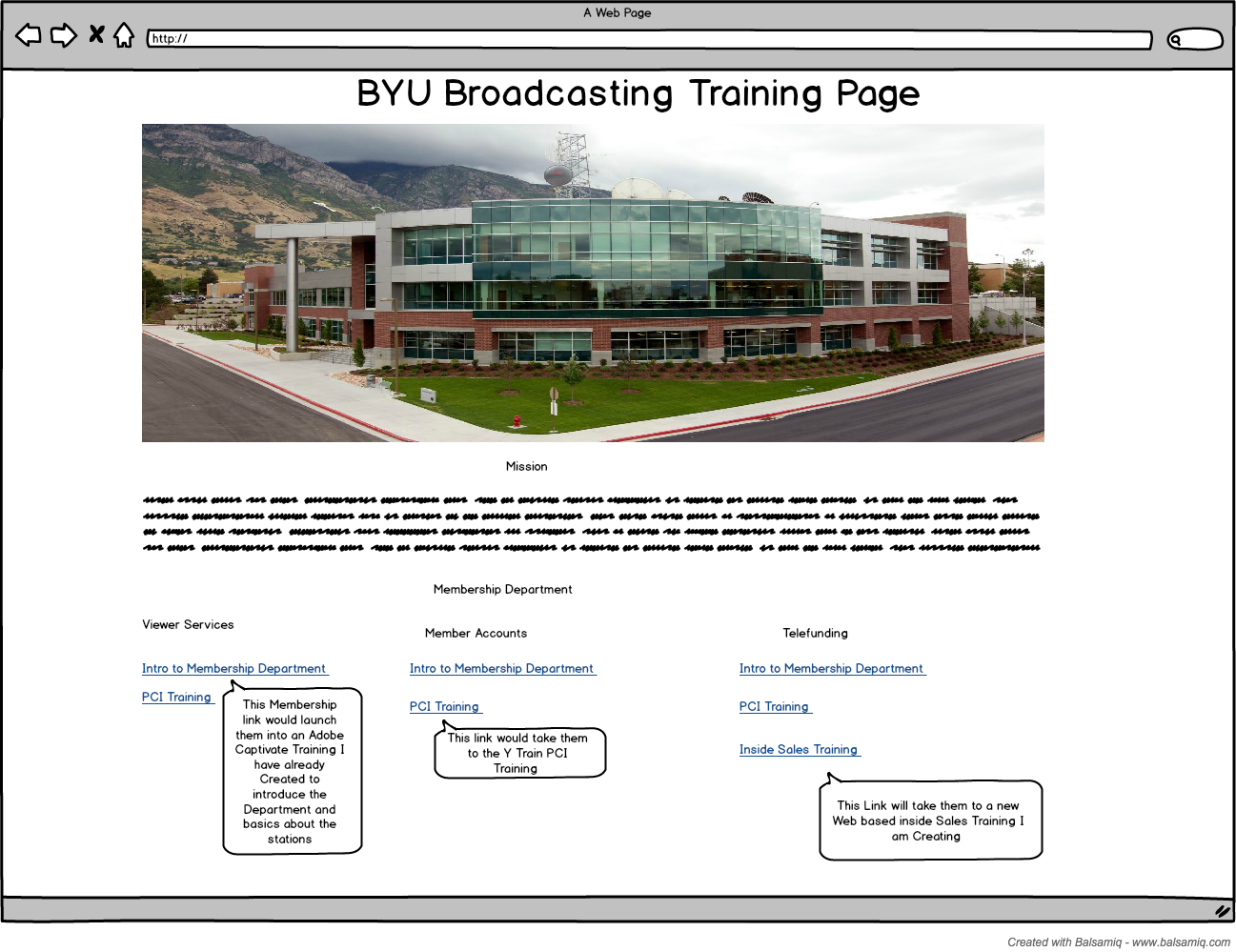
Step 4
Step 4 – 10/10 (I went through all the videos and took notes. I attached the notes below. I also Demonstrated using styles, selectors, and IDs on my website. As far as checking browser support and resolving conflicts, I have pretty extensive notes on how to do so in my notes. I also Checked out my site in different browsers to check for differences. I understand how to resolve conflicts as they arise as you will see in my notes.)
Click here for Website Step 4
Step 5
10/10 (I went through all the videos and attached the notes. I also demonstrated using font, transforming text, styling container elements, and working with color on my web pages.)
Click here for updated Website Step 5
Step 6
10/10 = I went through all the videos and attached the notes. I also found another Linda Training on creating a tabbed panel (like I thought I wanted to do for my Inside sales Training Page) and I demonstrated my ability to use JavaScript by doing all the JavaScript under the JavaExample.html link below following the walk though with Linda. This “simple” panel was very intense for me and I am wondering if I really want to go this route on my project. I will start messing around with it on my InsideSales page and see how it goes. I also added a pop up and date and time to my main BYU Broadcasting page which you can see under the step 6 link.
Step 7
10/10 = I went through all the videos and attached my notes. After talking with you on Thursday, I also went in and found more information on JavaScript from w3schools. I added some of those notes into my week 7 notes. I have added a smart form into my InsideSales Training. I believe this will work for a verification of training. I am sorry I had to take off early for a doctors appointment. I believe you wanted me to do something with a blur as I was leaving. In my files, I have attached a “blur test” where I use a JavaScript function to make the text entered in the textbox change to capital letters on blur. I also used jsLint to examine my code, and it found a lot of errors. 🙂 I watched the video on objects and prototypes, but as we talked about in class, I think that was way out of my league.
Thank for all your help.
Step 8
10/10 = I went through all the videos and attached my notes. I was also able get my videos added into my project in all the tabs. Next, I added in an audio clip that automatically starts running when they first visit the site to explain what the page is about and how to use it.
Notes = Step 8 (Audio&Video)
Website (without the videos). The videos made it too big, but you can see the site working from my FTP page. = Step 8
FTP Page = http://byubtraining.byu.edu
Step 9
10/10 = I went through all the videos (1-5 on Introducing PHP), and attached my notes. I then demonstrated using some PHP in the Test PHP file attached below. I demonstrated joining strings with a concatenation operator, using conditional statements, using PHP to calculate minutes and hours, and how to do a basic loop from an array.
Notes = Step 9 PHP Notes Week 1 (1-5)
PHP Test file = Phptest.php
Step 10
10/10 = I went through all the rest of the videos (5-10 on Introducing PHP), and attached my notes. I then demonstrated how to check for your php version. I also created an array of my team by name and used the PHP sort function to sort my team alphabetically in a list. I also used the PHP Date function. You can see all this in the Phptest.php file attached. Finally, thanks to you, I was able to get the form on my web page to work!!!
Thanks
Notes = Step 10 PHP Notes (5-10)
Website =Step 10